
Gmail Inbox Placement Consultants
On this page
Which email deliverability consultant should you use to improve Gmail inbox placement? Gmail inbox placement consultants worth hiring start in Google Postmaster Tools, check your mail against the sender requirements Gmail has enforced since February 2024, fix the authentication, spam-rate and list problems they find, and then prove the result with a placement test. Choose one who shows you that evidence and never guarantees what only Gmail decides.
Gmail is usually where a deliverability problem shows first. Mail reaches Outlook and corporate inboxes, while customers with Gmail addresses find invoices, receipts and newsletters in spam, or never see them at all. Gmail publishes more about its rules than any other mailbox provider, and it gives senders a free dashboard that shows how their domain is doing. That makes Gmail placement the most diagnosable part of deliverability, provided someone reads the evidence in the right order.
What a Gmail inbox placement consultant checks first
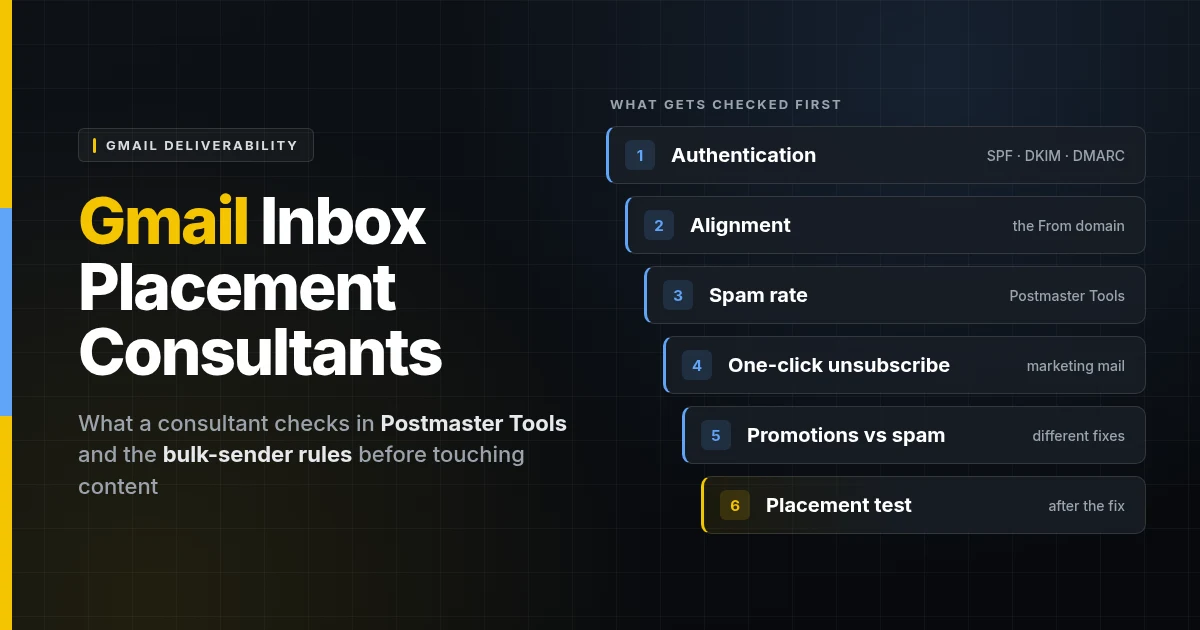
A Gmail inbox placement consultant reads the evidence Gmail itself publishes before changing a single record: Postmaster Tools data, the headers of a real message, and the domain’s DNS.
- Postmaster Tools access for the sending domain. If the domain is not verified in Postmaster Tools, that is the first job, because nothing else shows how Gmail sees the mail.
- The Compliance status dashboard, which marks each Gmail sender requirement as compliant or needing work.
- The spam rate trend over the last 30 to 120 days, measured against Gmail’s 0.1% and 0.3% thresholds.
- The headers of a real message delivered to a Gmail address. “Show original” displays the SPF, DKIM and DMARC results, and whether the From domain aligns with them.
- DNS for every sender. The SPF record and its lookup count, a DKIM key for each service that sends as the domain, the DMARC policy and where its reports go, and forward and reverse DNS (PTR) for the sending IPs.
- Unsubscribe headers on marketing mail, because one-click unsubscribe is a requirement for bulk senders, not a courtesy.
- Delivery errors and bounce codes, which name the reason Gmail rate-limited, deferred or rejected messages.
- Sending behavior. Volume spikes, list sources, how long it has been since each segment last engaged, and whether marketing and transactional mail share one domain.
Google Postmaster Tools dashboards a Gmail inbox placement consultant reads
Postmaster Tools is Google’s own view of a sender, and its dashboards cover spam rate, reputation, authentication, encryption and delivery errors for mail sent to personal Gmail accounts. The current version (v2) lists these dashboards:
- Compliance status: whether the domain meets each requirement in Gmail’s sender guidelines, with a Deliverability analysis tool that gives a recommendation about the domain’s status with Gmail.
- Spam rate: the percentage of messages recipients manually marked as spam.
- Feedback loop: campaigns that recipients marked as spam, for senders that tag their mail with feedback-loop IDs.
- Authentication: the share of mail passing SPF, DKIM and DMARC.
- Encryption: the share of mail sent over TLS.
- Delivery errors: the share of authenticated mail that was rejected or temporarily failed, with reasons such as rate limiting, suspected spam, a low-reputation domain or IP, or a listing on a public blocklist.
- Domain reputation and IP reputation: ratings of Bad, Low, Medium or High.
Two cautions separate a good consultant from one reading the dashboard at face value. First, the data covers only mail sent to @gmail.com and @googlemail.com addresses, is typically updated within 24 hours, and can be missing on low-volume days. Second, Google has said the Domain and IP Reputation dashboards will be retired and replaced, because reputation data “can be misleading as reputation is only one of many factors affecting deliverability.” A consultant who judges a domain by a “High” rating alone is working from the number Google itself is moving away from.
Gmail sender requirements since February 2024
Since February 1, 2024, every sender to personal Gmail accounts has had to meet a baseline, and senders of 5,000 or more messages a day have had to meet more. Starting November 2025, Gmail said it was ramping up enforcement, with temporary and permanent rejections for messages that fail the requirements.
| Requirement | All senders | 5,000+ messages a day |
|---|---|---|
| Authentication | SPF or DKIM | SPF and DKIM |
| DMARC | Not required | Required; a policy of p=none is acceptable |
| From-domain alignment | Not required | From domain aligned with the SPF or DKIM domain |
| Forward and reverse DNS (PTR) | Required | Required |
| TLS connection | Required | Required |
| Spam rate in Postmaster Tools | Below 0.3% | Below 0.3% |
| Unsubscribe | Not required | One-click unsubscribe on marketing and subscribed messages, plus a visible link in the body |
| Message format | RFC 5322 | RFC 5322 |
Two details catch businesses out. The 5,000 count covers every message from the same primary domain, so mail from example.com and news.example.com is added together. And bulk sender status is permanent: a domain that crosses the threshold once is treated as a bulk sender from then on, even if its volume falls. Google also requires a DKIM key of at least 1024 bits and recommends 2048.
Gmail spam rate thresholds: 0.1% and 0.3%
Gmail asks senders to keep their user-reported spam rate below 0.1% and never to reach 0.3%. The rate is calculated daily. Google describes the effect as graduated: rates above 0.1% already hurt inbox delivery for bulk senders, and 0.3% or higher hurts it more. A bulk sender above 0.3% cannot use Gmail’s mitigation request until the rate has stayed below 0.3% for seven consecutive days.
In practical terms, 0.3% is three spam reports per thousand messages delivered. Google also notes that improvements in spam rate take time to reflect positively on spam classification, which is why a fix made on Monday rarely shows in placement by Friday.
Promotions tab vs spam folder: what a consultant for Gmail inbox placement can change
The Promotions tab is part of the inbox, and landing there is not a deliverability failure; the spam folder is. With the default inbox type, Gmail sorts mail into categories, and it describes Promotions as “deals, offers, and other promotional emails.” A newsletter or sale announcement in Promotions has been delivered, and the recipient can see it.
Tab placement follows what a message is, so no consultant can reliably move marketing mail into Primary, and one who promises to is a warning sign. What a consultant can change is the mix. Gmail’s guidelines tell senders not to mix content types, and give the example of promotions inside sales receipts. Keeping receipts, password resets and account notices free of promotional content, and sending them from their own subdomain, protects the mail people most need to see.
How a Gmail inbox placement consultant fixes spam-folder delivery
A Gmail inbox placement consultant fixes spam-folder delivery in a set order, because reputation cannot attach to mail that fails authentication, and volume is not safe until reputation exists.
- Inventory every sender. Mailboxes, the website, invoicing, the CRM, marketing and support tools: anything that sends as the domain.
- Fix authentication and alignment. SPF under the ten-lookup limit, DKIM for each service, DMARC published at
p=nonewith reports going somewhere that parses them, then moved toward enforcement. - Separate the streams. Marketing, transactional and person-to-person mail on their own subdomains, so one campaign’s complaints cannot pull down the invoices.
- Clean the list. Suppress hard bounces, retire long-inactive contacts, and stop sending to anyone who did not ask for the mail.
- Make unsubscribing easy. One-click unsubscribe headers that work, and requests honored within 48 hours, as Google recommends.
- Pace the volume. Gmail’s advice for rate-limit errors is to send at a constant rate; a domain with little history needs a gradual ramp, not a launch-day blast.
- Test and monitor. A placement test after the fix, then the spam rate and Compliance status watched daily until they settle.
Each of these steps is covered in depth, with the reasoning for the order, in the email deliverability blueprint.
Red flags when hiring a Gmail inbox placement consultant
The clearest red flag is a promise that Gmail will put your mail in the inbox, because Google says it cannot guarantee that messages sent by email providers will pass Gmail’s spam filters, and it does not accept allowlist requests from them.
- “We’ll get you whitelisted with Google.” There is no such channel for senders or their consultants.
- A guaranteed inbox or open rate with no stated test. A real promise names the test, the mailbox providers it covers, and what happens if it fails. The guide to email deliverability consulting guarantees sets out what an honest one looks like.
- Engagement that is bought. Networks of seed accounts that open and rescue mail on a schedule tell you nothing about how real customers react, which is what Gmail’s spam rate measures.
- A fresh domain as the fix. Moving to a new domain leaves the cause in place and throws away whatever history the old domain had.
- No request for Postmaster Tools access or a real message’s headers. Without them, the diagnosis is a guess.
Which Gmail inbox placement consultant fits which sender
The right Gmail inbox placement help depends on whether you need a diagnosis, a fix, or proof that the fix worked.
| Option | What it covers | Cost | Best for |
|---|---|---|---|
| Do it yourself with Postmaster Tools | Gmail’s own data, header checks, DNS edits | Free | Someone comfortable editing DNS and reading headers |
| Your email platform’s support team | Settings inside that one platform, not the other services sending as the domain | Included in the plan | Problems confined to one platform |
| Inbox placement testing tool | Where test messages land; the fixing is left to you | Subscription | Teams with the skills to act on the results |
| Hands-on deliverability consultant | Diagnosis, the fix, and before-and-after evidence | Quoted per job | Businesses that need Gmail placement fixed and proven |
For a wider look at choosing and hiring one, see where to hire an email deliverability consultant.
How Yeevu works as a Gmail inbox placement consultant
Yeevu diagnoses Gmail placement from the evidence, fixes what it finds, and tests the result, with a written scope before any work starts.
- The email deliverability audit runs from a discovery session to a written report within 5 to 7 business days. It covers SPF, DKIM and DMARC, alignment, domain and IP reputation, list hygiene, inbox testing across Gmail, Outlook and Yahoo, the sending infrastructure and a blocklist check, and it rates each issue by severity with a prioritized fix list.
- The fix is carried out by the engineers who configure the systems, the same people who support them afterwards. Yeevu offers a free email deliverability audit, then a written quote before any remediation. The email deliverability services page sets out the full scope.
- HelpWithEmails, Yeevu’s own email deliverability service, makes an inbox placement promise on stated terms: the quote names the mailbox providers the placement test covers, such as Gmail; the test runs after the fix; and if mail lands outside the inbox, the work continues at no charge until the test passes. Details are at helpwithemails.com.
- YeevuFix, a Yeevu brand for fixed-price fixes, offers a Full Audit at $399 per domain that adds blocklist checks and spam-placement reporting.
For one published example, see the e-commerce email deliverability result: Yeevu reviewed the sending environment, corrected the authentication and alignment issues affecting delivery, and restored reliable transactional email.
What Yeevu does not do is promise where Gmail will put any individual message later. That stays Gmail’s decision for every sender, and it moves with how recipients react to what you send next.
Talk to a Gmail inbox placement consultant
If Gmail users are finding your mail in spam, the fastest start is to look at Postmaster Tools and one real message’s headers together. Book a free 30-minute consultation to go through them with a Yeevu engineer, or request an email deliverability audit for the full written picture.