
Email Deliverability Blueprint – Avoid Spam and Land in Inbox
Email Deliverability Email Marketing
On this page
Most deliverability advice arrives as a list of fixes: publish an SPF record, clean your list, avoid spammy words. The fixes are usually right. The trouble is that they are handed over without an order, so people apply them in whatever sequence they were read, then wonder why nothing improved.
Deliverability is not a setting. It is the outcome of a sequence, and the sequence matters as much as the steps. Authentication has to exist before reputation can attach to anything. Reputation has to be built before volume is safe. Volume is only safe while the list stays clean, and the reputation itself is only ever made of how people reacted to the content that reached them. And none of it can be maintained without monitoring, because the receiving side never tells you when it quietly starts filtering you.
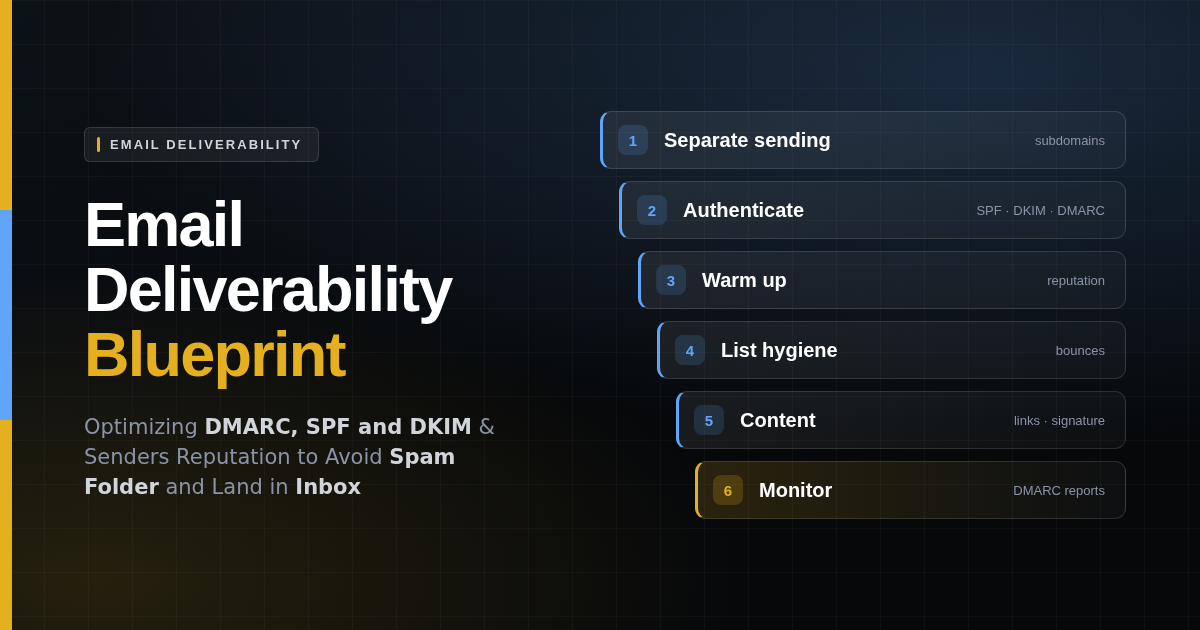
The blueprint below sets the stages out in the order they have to happen. Each one assumes the stage before it is finished. Working out of order is the single most common reason a business does all the right things and sees no change.
One boundary before the first stage. This is a blueprint for mail people asked to receive: transactional messages, business correspondence, newsletters and campaigns to customers who opted in. Cold outreach has different mechanics and needs its own separate domain, its own warm-up and its own infrastructure. Running it through the domain that carries your invoices and your support replies is how businesses lose both.
How to avoid the spam folder and land in the inbox
The short version, in the order the work has to happen. Each point is a stage of the blueprint below, and every one of them assumes the point above it is already done.
- Inventory every application that sends email for the organization. You cannot separate or authenticate senders nobody has written down.
- Split sending by purpose across subdomains. Person-to-person mail on the root domain, transactional, application and marketing mail each on their own, so one bad campaign cannot take the invoices with it.
- Put cold outreach on a separate domain entirely. Never a subdomain, and never on the domain that carries your business correspondence.
- Publish an SPF record, keep it under ten DNS lookups, and end it with
-allonce you are confident the list of senders is complete. - Sign outgoing mail with DKIM using a 2048-bit key and a separate selector for each sending service.
- Publish DMARC at
p=none, read the reports, then move top=quarantineandp=reject. Skipping straight to reject is the classic self-inflicted outage. - Point
ruaat something that actually parses the reports. Aggregate XML in an ordinary mailbox is an attachment nobody opens. Leaverufoff. - Warm each sending identity over four to six weeks, most engaged recipients first, with no pauses. A cold start at full volume looks like a compromised account.
- Suppress hard bounces after one, and retire contacts who have not opened anything in roughly six months.
- Keep spam complaints under 0.1% and make one-click unsubscribe work. Someone who cannot find the unsubscribe link uses the spam button instead.
- Clean every list before a significant send. Addresses decay with time, not with provenance, and abandoned ones get recycled into spam traps. Validate and drop the failures — though validation removes bad addresses, it never creates consent.
- Link only to domains you control, keep real text alongside images, and send a plain-text part. An image-only message gives a filter nothing to read.
- Audit the email signature. Above all, check that footers and disclaimers are applied before DKIM signing — appending them afterwards silently invalidates the signature and undoes every record above.
- Send only attachments the recipient expects, in formats a scanner can open. No password-protected archives.
- Watch DMARC reports, provider postmaster tools and blocklists on a cadence. Filtering is silent — nothing bounces, and nobody tells you.
The order is the argument. Working through these out of sequence is the most common reason a business does all of the right things and sees nothing change. The rest of this article takes each stage in turn and explains why it depends on the one before it.
Stage 1: Separate sending domains and subdomains by purpose
Reputation is tracked per sending domain, and increasingly per subdomain. That single fact drives the first decision, and it is the one most businesses skip.
If your invoices, your password resets, your sales team’s replies and your monthly newsletter all leave from yourcompany.com, they share one reputation. A campaign that draws complaints does not just hurt the next campaign. It hurts the password reset a customer is waiting on, and it hurts the reply your account manager sent this morning. You have made your most important mail hostage to your most risky mail.
Email sending inventory: every application that sends on the organization’s behalf
You cannot separate sending you have not identified, and nearly every organization sends from more places than it believes. Before touching DNS, write down every system that puts mail into the world carrying your name:
- The mail platform itself — the mailboxes people type into.
- Marketing and campaign tools — your sending platform, plus anything with a broadcast or automation feature bolted onto it.
- The product or website — sign-up confirmations, password resets, receipts, notifications, contact-form relays.
- Billing and finance — invoicing, payment reminders, chasing letters, the accounting package.
- Support and service desk — ticket notifications and agent replies, which often send as the agent rather than as the desk.
- Internal systems — recruitment, monitoring and alerting, build pipelines, backup reports, anything that emails a status to somebody.
- Third parties sending as you — a scheduling tool, a review-request service, an agency running campaigns on your behalf.
Ask each department what it uses rather than assuming, and read whatever SPF record you already publish, since it is a record of what somebody once authorized. The finished list is rarely the one people expect, and the entries nobody can account for are the interesting ones.
Assign each sending system its own subdomain
With the inventory in front of you, assign each sending system a subdomain of your main domain instead of pointing everything at the root. Reputation then accumulates per system, and trouble in one is contained inside it.
- The root domain — person-to-person business mail. Replies, correspondence, anything a human types. This is the reputation you protect most carefully, because it is the one you cannot route around.
- A transactional subdomain, such as
mail.yourcompany.com— receipts, password resets, order confirmations. High engagement, low complaint rate, and the mail that hurts most when it is delayed. - An application subdomain, such as
app.yourcompany.com— mail your software sends rather than your staff: system alerts, monitoring and scheduled reports, workflow notifications, digests. The volume is spiky by nature and the engagement is low, so a runaway loop or a noisy integration here must never be able to take your customer mail down with it. - A marketing subdomain, such as
news.yourcompany.com— newsletters and campaigns to your opted-in list. This is where complaint rates live, so it is the reputation you can afford to have take a hit. - Cold outreach — a separate domain entirely, such as
anotherdomain.com. Not a subdomain of your main domain. Prospecting mail goes to people who never asked for it, so complaints and spam reports come with the territory, and a subdomain still hangs that history off the organizational domain your invoices depend on. Register a different domain, point it at your real site, warm it on its own, and keep it structurally separate from everything above.
Larger organizations go a level finer and give each application its own name — billing.yourcompany.com, support.yourcompany.com, careers.yourcompany.com — so a single misbehaving system can be throttled, rebuilt or cut off without disturbing anything else. The right granularity is the level at which you could switch off any one sender tomorrow and still deliver the mail that matters.
Subdomains inherit some trust from the parent domain, which is why they beat unrelated domains for everything your business actually corresponds with, and it keeps DMARC alignment straightforward in the next stage. Cold outreach is the one case that inverts the argument: there, inheriting from the parent is precisely what you are trying to avoid.
Cold email laws by country: where permission is required before the first message
Separating cold outreach protects your other mail. It does not make the outreach lawful. That is decided by where your recipients are, not where you are, and the regimes disagree on the most basic question of all: whether you need permission before the first message. A list you may legally mail from Texas can be unlawful to mail into Toronto or Berlin. Each law below links to the regulator or the statute itself, so nothing here has to be taken on trust.
| Market | Main law | Permission needed first? |
|---|---|---|
| United States | CAN-SPAM Act | No — but headers and subject lines must not deceive, the message must be identifiable as an advertisement, a valid postal address must appear, and opt-outs must be honored within ten business days |
| Canada | CASL | Yes — express or implied consent before sending, and you must be able to prove it. The strictest of the major regimes |
| European Union and EEA | ePrivacy Directive, with GDPR over the data | Yes for individuals, with a narrow exemption for existing customers. You also need a lawful basis merely to hold the contact details |
| United Kingdom | PECR, with UK GDPR over the data | Yes, with a “soft opt-in” for people who previously bought something similar from you |
| Australia | Spam Act 2003 | Yes — express or inferred consent, sender identified, working unsubscribe |
| Japan | Act on Regulation of Transmission of Specified Electronic Mail, with APPI | Yes — opt-in, with records of consent retained |
| Singapore | Spam Control Act, with the PDPA over the data | No, but unsolicited commercial messages must be labelled and carry an unsubscribe, and the Do Not Call registry applies |
| South Africa | POPIA, section 69 | Yes for anyone who is not already your customer |
| Brazil | LGPD | No dedicated anti-spam statute, but you need a lawful basis for the personal data and must honor objections |
| India | DPDP Act 2023 | Yes — consent-based, with notice requirements |
| China | PIPL, with the Advertising Law | Yes — separate consent for marketing use |
| Nigeria | Nigeria Data Protection Act 2023 | Yes — consent or another lawful basis, with a right to object |
Two practical consequences. Segment by where the recipient is rather than treating one list as one audience, because the obligations travel with them. And keep the consent records the consent-first regimes expect, since in those markets the burden is on you to show permission existed, not on the recipient to show it did not. Everything above is a description of the landscape, not legal advice — take advice for the markets you actually sell into.
Do this first. Every later stage attaches to a sending identity, and changing that identity later means starting the reputation work again.
Stage 2: Authenticate the domain with SPF, DKIM and DMARC
Authentication does not make your mail welcome. It makes it attributable. Until a receiving server can tell that a message claiming to come from your domain really did, it has nothing to attach a reputation to, and its safest assumption is suspicion.
Three records do this work, and they answer different questions.
SPF records: authorizing the servers that may send as the domain
SPF is a DNS TXT record listing the servers authorized to send mail for your domain. A receiving server checks the sending server’s address against that list.
v=spf1 include:_spf.google.com include:sendgrid.net ~allTwo details cause most SPF failures in practice. The first is the ten-lookup limit: SPF resolution is capped at ten DNS lookups, each include costs at least one, and exceeding the cap makes the whole record fail rather than degrade. The second is the ending. ~all is a soft fail, meaning “treat unlisted senders as suspicious”; -all is a hard fail, meaning “reject them”. Move to -all once you are confident the list is complete, not before.
SPF gets a piece of its own, in more depth than belongs here, in what an SPF record is and why it matters.
DKIM signing: proving the message was not altered in transit
DKIM signs outgoing mail with a private key and publishes the public key in DNS. The receiving server verifies the signature, which proves both that your domain authorized the message and that its headers and body were not modified in transit.
Use a 2048-bit key where your provider supports it. Give each sending service its own selector, so your marketing platform and your transactional provider sign independently and either can be rotated or removed without touching the other.
DMARC policy: p=none to p=reject, alignment and aggregate reports
DMARC is the policy layer. It tells receivers what to do with mail that fails SPF and DKIM, and it asks them to report back on what they saw.
v=DMARC1; p=none; rua=mailto:dmarc@yourcompany.comThe critical word is p=none. It changes nothing about how your mail is handled. It only asks receivers to send you aggregate reports. That is exactly what you want at the start, because those reports check the inventory you built in stage one against what receivers actually see. Nearly every one turns up something the inventory missed: an old CRM, a helpdesk, a form on a site nobody maintains.
That said, only publish rua if something is actually going to read what comes back. Aggregate reports arrive as compressed XML, one file per receiver per day, and pointed at an ordinary mailbox they become an attachment nobody opens. The tag then looks like diligence while delivering nothing. Send it somewhere that parses and presents the reports, or leave it off until you have somewhere to send it. For anyone without a system for that, Yeevu’s DMARC monitoring ingests and reads the reports, on a free plan with no card required.
The ruf tag deserves more caution and is usually best left off entirely. It asks for per-message failure reports, which can carry recipient addresses and message content. Most large receivers do not send them at all, and the ones that do hand you other people’s personal data that you then have to look after. The related fo tag only controls when those failure reports are generated, so it does nothing without ruf — which is why neither appears in the record above.
Move through the policies deliberately:
p=none— observe. Stay here until the reports show every legitimate sender passing, which usually takes a few weeks.p=quarantine— failures go to spam. Move here once the reports are clean, and watch them for anything you missed.p=reject— failures are refused outright. This is the destination, and it is what actually stops someone spoofing your domain.
Skipping to p=reject because it sounds strongest is the classic self-inflicted outage. Every legitimate sender you forgot to authenticate stops being delivered, and because the mail is refused rather than filed in spam, nobody sees it disappear.
One more detail worth knowing: DMARC requires alignment, not merely a pass. The domain in the visible From address has to match the domain SPF or DKIM authenticated. Relaxed alignment, the default, accepts a subdomain matching its parent — which is why the subdomain structure from stage one keeps this simple.
MTA-STS and TLS-RPT: enforcing encrypted delivery
Two smaller records finish the job. MTA-STS tells other servers that your domain requires encrypted delivery and refuses to fall back to plaintext. TLS-RPT asks them to report failures when that goes wrong. Neither affects inbox placement directly. Both close a downgrade attack that authentication alone does not cover, and they cost one afternoon.
BIMI: displaying a verified logo once DMARC is enforced
BIMI, Brand Indicators for Message Identification, is a DNS record pointing at a logo, so participating mailbox providers show that logo as the sender’s avatar instead of an initial in a coloured circle. It is the one part of this stage the recipient can actually see.
default._bimi.yourcompany.com  TXT  "v=BIMI1;
    l=https://yourcompany.com/logo.svg;
    a=https://yourcompany.com/vmc.pem"
Two things disqualify most domains before they start. The logo must be a square SVG in the restricted Tiny Portable/Secure profile, served over HTTPS, which is a conversion job rather than an export. And DMARC must already be at p=quarantine or p=reject. A domain sitting at p=none cannot use BIMI at all, which is why this belongs at the end of stage two rather than anywhere earlier: it is the payoff for having finished the policy progression, not a separate task.
What it does not do is affect delivery. BIMI changes what the recipient sees, not where the message lands. Treating it as a fix for inbox placement is a category error.
Verified and unverified BIMI: VMC, CMC and self-asserted records
The difference is the a= tag, and it decides which providers will show anything at all.
| Type | What the record carries | What it costs and requires |
|---|---|---|
| Unverified (self-asserted) | l= only — a logo URL, no certificate |
Nothing beyond producing a compliant SVG. Nobody checks that the logo is yours, which is exactly why the providers that insist on evidence ignore it |
| Verified | l= plus a=, pointing at a Verified Mark Certificate or a Common Mark Certificate |
Roughly a four-figure sum a year from one of the few issuing authorities, and evidence of the mark itself |
The two certificate types differ in what they ask for. A VMC requires a logo registered as a trademark with an accepted intellectual property office, and the registered mark has to match the logo in the record. A CMC exists for organizations whose logo is not a registered trademark, and rests on evidence of prior use instead. For anyone without a trademark already granted, the application is the long pole in this work, measured in months, not the certificate.
Provider support is uneven and moves, so it is worth confirming against current documentation rather than a blog post. The stable shape of it: self-asserted records display in some mailboxes and are ignored in the strictest ones, while a certificate is what the largest consumer providers require before showing a logo, and it is what earns the verification tick displayed alongside it where one exists.
A sensible order is to publish the self-asserted record first. It costs only the SVG work, it proves the logo and the record parse correctly, and it displays wherever a certificate is not demanded. Buy the certificate when the brand appears in enough inboxes for the avatar to be worth a recurring bill, and when the trademark position is already settled.
Stage 3: Warm up the sending domain to build sender reputation
A correctly authenticated domain with no sending history is not trusted. It is merely legible. Trust is earned by sending mail that people open, reply to and do not report, over enough time for the pattern to be believable.
This is why a new domain or a new provider cannot start at full volume. From the receiving side, a domain with no history that suddenly sends fifty thousand messages looks exactly like a compromised account or a throwaway used for a burst. The filtering that follows is not a judgment on your content. It is a judgment on the shape of the traffic.
Warm-up is the deliberate version of the history you would otherwise have to accumulate by luck:
- Start small and rise gradually. Begin in the tens per day and increase steadily over four to six weeks. The exact curve matters less than that it is a curve rather than a step.
- Send to your most engaged people first. Opens and replies are the positive signal. Front-loading the recipients most likely to engage builds reputation faster than sending to the whole list in list order.
- Warm each sending identity separately. Reputation attaches to the domain and the sending address, not to your company. A new subdomain starts from nothing even if the root domain is well established.
- Do not pause and restart. A gap followed by a resumption reads as another cold start. Consistency is itself a signal.
Warm-up is also the stage people try hardest to skip, usually because a campaign date was set before anyone asked about infrastructure. It cannot be compressed. The receiving side is measuring elapsed time and consistency, and neither can be bought.
Stage 4: List hygiene — bounces, complaint rates and unsubscribes
Reputation is not a level you reach. It is a rolling average, and list quality is the input you control most directly.
Handle bounces properly. A hard bounce means the address does not exist, and it must be suppressed permanently after one. Continuing to send to invalid addresses is one of the clearest signals that a sender is not maintaining their list. Soft bounces are temporary and can be retried, but an address that soft-bounces repeatedly should be retired too.
Retire people who stopped listening. A subscriber who has not opened anything in six months is not a future customer, they are a future complaint or a future spam-trap hit. Set a sunset policy, make one honest attempt to re-engage, and then stop sending. Shrinking a list deliberately almost always improves the results of the mail that remains.
Keep the complaint rate low. Major providers publish a threshold of 0.3% of messages reported as spam, and treat 0.1% as the level a healthy sender stays under. That is not much room: three complaints per thousand messages is enough to cause trouble. Complaints usually mean the mail was unwanted, unexpected or too frequent, and no amount of technical work fixes any of those.
Make unsubscribing trivially easy. Bulk senders are now expected to support one-click unsubscribe in the message headers, honored within two days, alongside a visible link in the message body. This looks like a concession and is not. Someone who cannot find the unsubscribe link uses the spam button instead, and that costs you far more.
Clean every list. Address decay is a function of time, not of where the list came from. People change jobs, mailboxes are abandoned, domains lapse — and abandoned addresses get recycled into spam traps precisely to catch senders who never noticed. A list collected honestly three years ago and left alone since carries the same risk as one that was bought.
So validate before any significant send, remove every address that fails, and start with the smallest and most recently active segment, so a problem surfaces on a hundred messages rather than a hundred thousand. Where a list came from somewhere else — bought, inherited in an acquisition, exported from a system nobody remembers — the same cleaning applies, with one thing it cannot do for you. Validation strips addresses that would bounce and some known traps. It does not turn a non-consented list into a consented one, and in the consent-first markets listed earlier that distinction is the entire legal question.
Treat a blocklist listing as a symptom, not the disease. Public blocklists are queried by receiving servers while the connection is still open, and a listing can stop a domain or an IP address reaching anyone who consults them. But being listed is almost never the original fault. It is the visible end of something that already happened further back: a spam trap hit from a bought or long-stale list, a complaint spike, a compromised mailbox quietly sending on someone’s behalf, or a neighbour misbehaving on shared sending infrastructure. Delisting without finding the cause just schedules the next listing.
Keep a sense of proportion about which list, too. A Spamhaus entry is worth dropping everything for. Some smaller operators list entire address ranges or whole networks, are widely ignored by the providers that matter, and will offer to remove an entry faster for a fee — which is not a service worth buying. Reputable lists remove entries by themselves once the behavior stops. And a clean record proves less than it appears to: the largest consumer providers lean mainly on their own internal reputation data rather than public lists, so being on no blocklist means nothing has gone catastrophically wrong, not that mail is arriving.
Stage 5: Message content: subject lines, links, images and HTML quality
This is the stage that gets skipped. A team spends weeks on DNS records and a warm-up schedule, sends a campaign that irritates people, and then blames the infrastructure when the next one lands in spam. The records decide whether a message is considered. The content decides whether it is wanted — and being wanted is what stage three was quietly made of, because sender reputation is nothing more than an average of how people reacted to previous content.
Filters read the message, not only the envelope. A few things carry disproportionate weight.
Every link inherits the reputation of the domain it points at. A message is judged partly on where it sends people, so a link to a domain somebody else has been abusing counts against a sender who has done nothing wrong. Public URL shorteners are the common own goal: the shortener’s domain carries every other customer’s behavior, including the phishing campaigns. Link to domains under your own control, and where click tracking is needed, run it on a subdomain of your own rather than a shared one.
An image-only message gives a filter nothing to read. A single large graphic with a line of alt text underneath is a decades-old technique for hiding content from classifiers, and it is still treated as one. Keep a genuine balance of real text to images, and send a plain-text alternative part alongside the HTML so there is always something to parse.
Deceptive subject lines cost more than they earn. The “spam trigger words” lists circulating online are largely folklore — modern filters weigh complaints and engagement far above vocabulary. What genuinely does damage is the gap between what a subject promises and what the message delivers, because that gap is precisely what makes someone reach for the spam button instead of the delete key. In the United States a misleading subject line is also a CAN-SPAM violation in its own right.
Broken HTML reads as evasion. Malformed markup, text hidden behind CSS, white text on a white background, a body consisting of one tracking pixel: filters have seen every one of these used deliberately, so a message that resembles them by accident is scored as though it were not an accident. Send clean, valid HTML that renders without JavaScript and degrades sensibly with images blocked.
The email signature is the most expensive piece of content nobody audits. It is attached to every message every employee sends, including the replies, quotes and invoices leaving the root domain — the one reputation stage one said cannot be routed around. It is built once, usually by whoever owned the template that year, and then never looked at again. When it causes damage it looks random from the inside: a vague complaint that “some emails go to spam”, varying by thread length, by whether images loaded, by which client rendered it. Four failure modes, in rough order of what they cost.
- A disclaimer appended after DKIM signing invalidates the signature. Legal footers added by a gateway, appliance or mail-flow rule modify the body after it was signed. DKIM then fails, DMARC alignment fails with it, and every record from stage two stops counting for those messages. This quietly undoes the most expensive work in the blueprint, emits no error anyone will see, and is worth checking before anything else: whatever appends the footer must do so before signing, not after.
- Images multiply down a thread. A logo, six social icons and an award badge is eight remote images per message. A ten-message client conversation carries eighty, each one a request to a remote host. The text-to-image balance collapses precisely on the long human exchanges that matter most, and blocked images leave a wall of broken placeholders where the content should be.
- Banners turn correspondence into advertising. A promotional strip beneath the signature attaches campaign links and campaign framing to one-to-one mail the recipient never opted into. It is also the fastest route to a complaint on a message that had no business drawing one.
- Signature management platforms are senders nobody inventoried. Some route mail through their own infrastructure; most host the images on a shared domain whose reputation is not yours. Both belong in the stage one inventory and the stage two records, and in practice neither is ever there.
The remedy is unglamorous. Text wherever text will do, one image at most, links only to domains under your own control, no tracking pixel, and confirmation that the footer is applied before the message is signed. It is a half-day of work on the mail that carries the most value per message.
Attachments are read as intent, not just as payload. In transactional and one-to-one mail an expected PDF invoice or receipt is ordinary and passes without comment. In bulk mail an attachment is unusual enough to be a signal on its own, because legitimate campaigns rarely need one while the senders who do attach files at volume are overwhelmingly the ones being filtered. The rule is not to avoid attachments but to send only what the recipient is already expecting, in a format a scanner can open.
What gets a message refused outright is fairly consistent across providers: executables and scripts, often even when buried in an archive; macro-enabled Office documents; and HTML attachments, which are a phishing staple and are commonly quarantined on sight. Worst of all is the password-protected archive, because it announces that its contents cannot be inspected, which is precisely what malware does to evade scanning. Where a file is large or its format is awkward, a link to it on a domain under your own control will reach more inboxes than the file itself.
A stable sending identity is part of the content. The from name and address are what recipients recognize before anything else, and changing them resets that recognition. Pick them, then leave them alone. A reply-to that goes somewhere monitored matters too, since replies are one of the strongest positive signals a mailbox provider can observe.
Frequency is the content decision with the most leverage. Most complaint problems are not caused by a bad message but by too many adequate ones. Sending less often, to people who have shown they want it, reliably outperforms sending more to everybody — and it improves every other number in this blueprint at the same time.
None of this is a separate discipline bolted onto deliverability. It is where the reputation built in stage three actually comes from, which is why it sits before monitoring rather than after it.
Stage 6: Monitor deliverability with DMARC reports and postmaster tools
The uncomfortable part of deliverability is that failure is silent. Nothing bounces. No error appears. Your platform reports the message as delivered, because it was accepted by the receiving server. It was simply filed somewhere the recipient will not look. Businesses routinely discover this months later, from a customer who mentions in passing that they never got anything.
So the last stage is instrumentation, and it is the one that turns the first four from a project into a practice.
- DMARC aggregate reports. These arrive as XML and are unreadable raw, so route them somewhere that parses them. They tell you what is sending as your domain, and whether it passes.
- Provider postmaster tools. Google and Microsoft both publish sender-side dashboards showing your reputation, spam-complaint rate and authentication results, for their own users. Between them they cover most business inboxes, and they are the closest thing to seeing yourself from the outside.
- Blocklist status, on a cadence rather than in a panic. Check the domain and the sending IP addresses against the operators that carry weight, so a listing surfaces within days instead of being discovered from a customer complaint. What to do about one is in stage four: find the cause before requesting removal.
- Your own engagement metrics, read as deliverability data. Open rates falling at one provider while holding steady at others is a filtering problem, not a content problem, and the pattern shows up in the segment breakdown long before anyone complains.
Check the postmaster dashboards weekly once you are sending at volume, and read the DMARC reports monthly. For a quick read on where a domain currently stands, Yeevu’s deliverability checker inspects the public side of this — authentication records and how they are configured — without needing access to anything.
Email deliverability checklist: what good looks like
A domain that has been through all six stages ends up in roughly this condition:
| Signal | Target |
|---|---|
| SPF | Published, under ten lookups, ending in -all |
| DKIM | 2048-bit, a separate selector per sending service |
| DMARC | p=reject, with aggregate reports going somewhere they are read |
| Sending identity | Split by purpose: root, transactional, marketing |
| Warm-up | Each sending identity ramped over four to six weeks, engaged recipients first, no gaps |
| Spam complaint rate | Under 0.1%, and never near 0.3% |
| Hard bounces | Suppressed after one, permanently |
| Blocklists | Not listed by the operators that carry weight; any listing traced to its cause before delisting |
| Unengaged contacts | Sunset after roughly six months of no opens |
| Message content | Links only to domains you control, real text alongside images, a plain-text part, subject lines that match the message |
| Email signature | Applied before DKIM signing, not after; minimal images, no promotional banner on one-to-one mail |
| Monitoring | Postmaster dashboards weekly, DMARC reports monthly |
None of this guarantees any individual message reaches an inbox, and anyone who promises that is selling something they cannot control. Filtering decisions are made by the receiving provider using signals nobody outside it can see. What this blueprint does is remove every technical reason for your mail to be doubted, and give the receiving side a consistent, well-behaved sender to build trust in. That is the part you own, and in practice it is the part that is broken.
Four common email deliverability mistakes
The failures that turn up in audits are remarkably consistent.
Authentication set up once, years ago. The records exist, which is why nobody looks at them, but the SPF record still authorizes a platform the business left in 2021 and has drifted past the ten-lookup limit. It has been failing silently since.
DMARC left at p=none indefinitely. Publishing the record felt like completing the task. But p=none enforces nothing, so the domain is still spoofable and the reports nobody reads are the only thing it produces.
Everything sent from one domain. A newsletter draws a normal number of complaints, and support replies start landing in spam a week later. The connection is rarely made, because the two look unrelated from the inside.
A migration treated as a switch. Mail moves to a new platform on a Friday, at full volume, from a sending identity with no history. The new platform is blamed for a problem that is really an absent warm-up.
If any of these sound like your setup, the symptoms are worth reading about directly in why business emails stop reaching inboxes.
Where to start with email deliverability
If you are starting from nothing, work the stages in order and do not let a campaign deadline push you past one. If you are trying to repair something that used to work, start at stage two anyway: publish DMARC at p=none and read the reports for a fortnight. That inventory of who is sending as your domain answers most questions before you have to guess at any of them.
Book an email deliverability consultation
Every stage above can be done in-house, and plenty of teams do it well. What it takes is an engineer comfortable in DNS, access to every system in the stage one inventory, and the patience to sit at p=none for a fortnight while the reports come in before touching the policy.
Where the constraint is that time or that access, Yeevu runs the same six stages as an engagement: the sender inventory, the subdomain split, SPF, DKIM and DMARC through to enforcement, the warm-up schedule, the content and signature audit, and the monitoring that stops it drifting back. What gets fixed is the technical position — correct records, verified mail flow, a domain that can no longer be spoofed, and someone reading the reports. Where any individual message lands afterwards stays the receiving provider’s decision, as it does for every sender.
Book a free 30-minute consultation to go through where a domain stands today and what the sequence would look like for it.